Overview
ORIX Audio is a recorder and an audio laboratory in one app. Record a meeting, a lecture or a voice note, then see it, measure it, transcribe it, edit it and export it, without an account and without your audio leaving your device.
Every waveform, spectrum and number on screen is computed from the audio itself. Levels are given in dBFS, relative to digital full scale, never presented as sound pressure, and estimates are labelled as estimates. Features that cannot be honoured are not offered: there is no MP3 export, no automatic speaker identification and no cloud fallback for transcription.
Transcription runs on the device in the languages the system supports. On devices with Apple Intelligence, summaries, key points, action items and decisions are written on-device from the transcript, each linked to the line it came from.
Key features
- 01
A recorder built around not losing audio
Six presets, from compact AAC to 24-bit WAV and Apple Lossless, with markers, pause and resume, and level meters with clip detection. The capture master is an append-only file that is valid after every write; an interrupted session is offered for recovery at the next launch.
- 02
Frequency-coloured waveforms
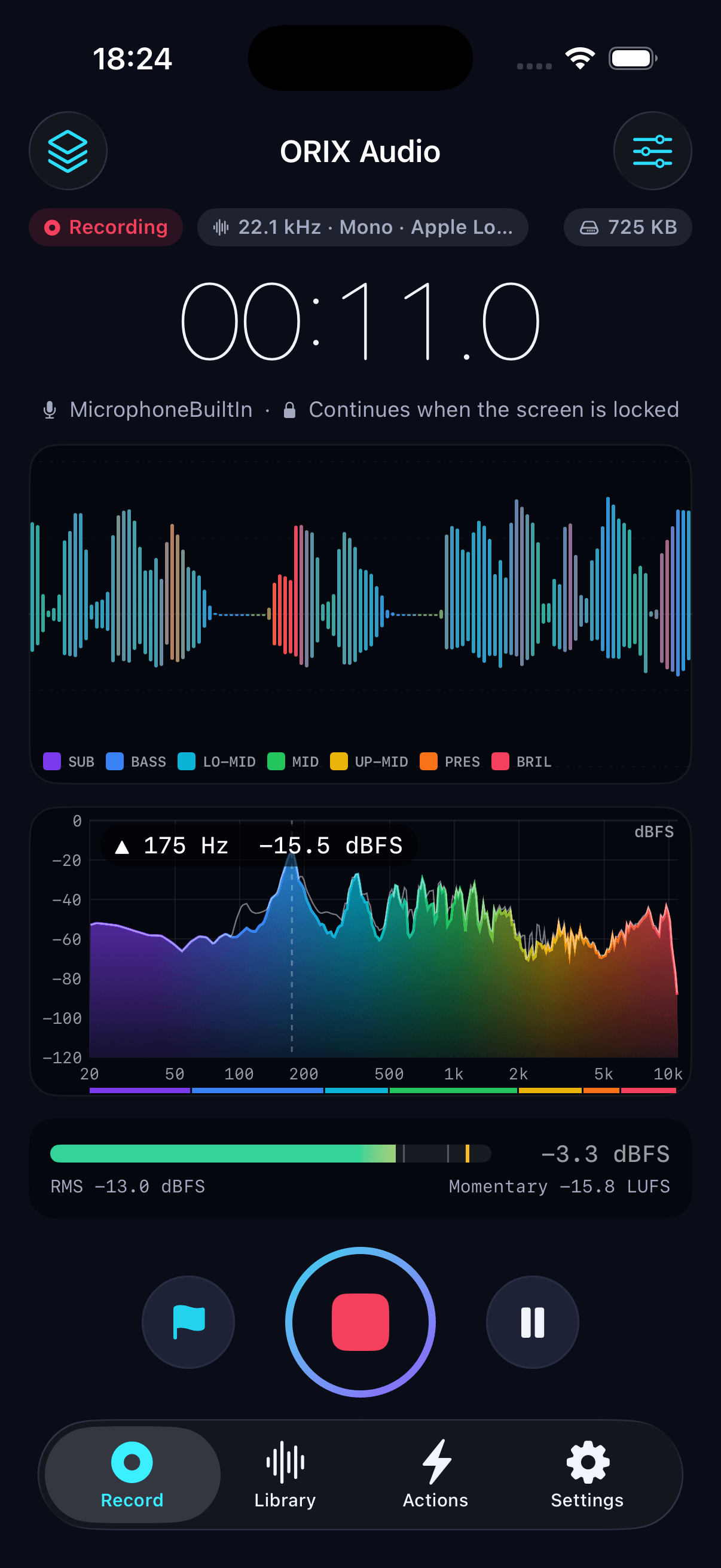
Each bar is coloured from an FFT of that moment, split into seven bands from sub-bass to brilliance. Four drawing styles share the same data, including a band-share view that is readable without colour vision.
- 03
Spectrum analyzer
Live while recording and at the playhead for files: FFT sizes from 1024 to 16 384, six windows, peak hold and a frequency cursor. Amplitude, power and power spectral density are three different scalings, each labelled with its unit.
- 04
Zoomable spectrogram
Time across, frequency up, amplitude in dBFS as colour, with six palettes including colourblind-friendly and high-contrast. It is computed in tiles, so a multi-hour recording is never loaded whole.
- 05
Measurement laboratory
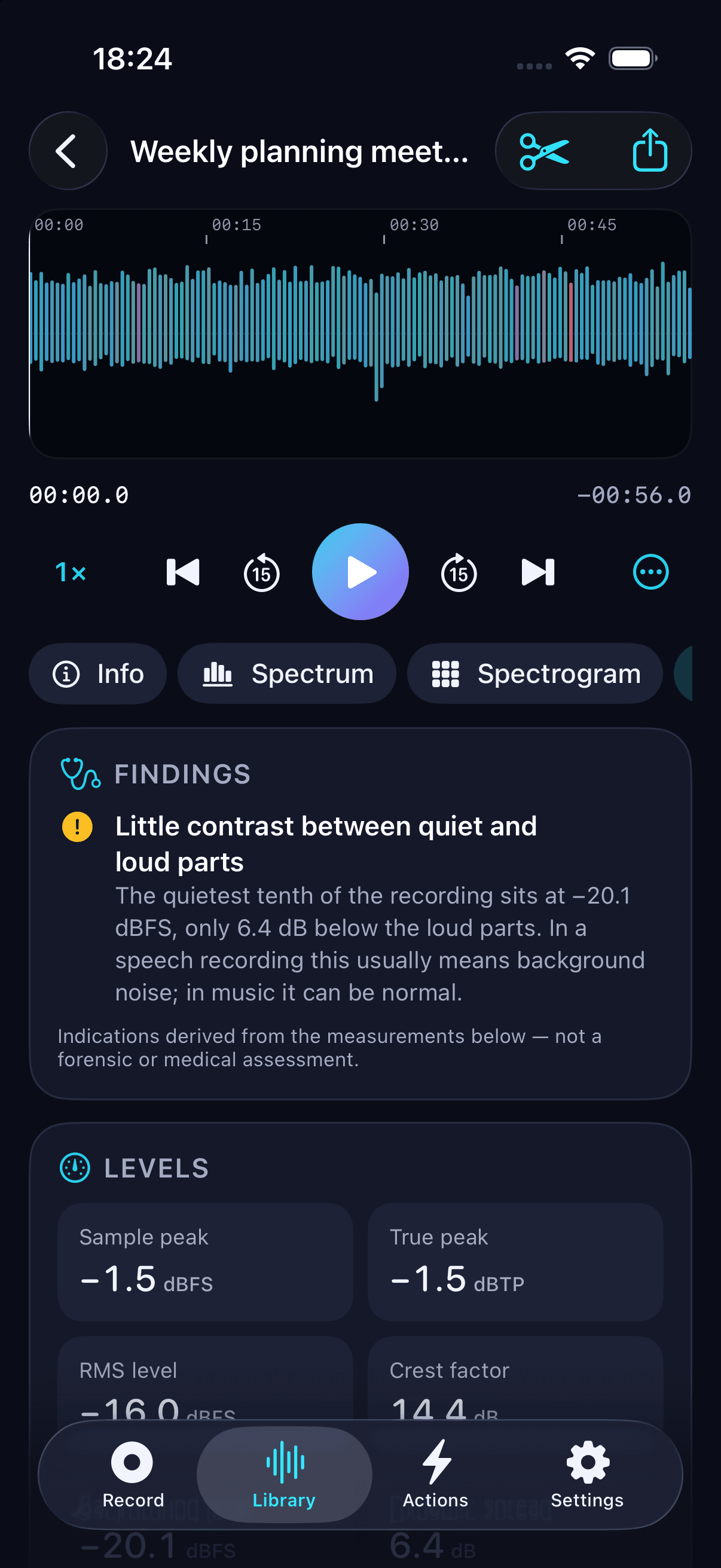
Peak, RMS, crest factor, clipping and silences; loudness to ITU-R BS.1770-4 with integrated, short-term and momentary LUFS, loudness range and true peak; spectral centroid, bandwidth, rolloff, flatness and band energy. Findings are indications drawn from the numbers, not forensic or medical conclusions.
- 06
On-device transcription
Transcription runs on your device in the languages it supports, with no server fallback. Search, edit line by line, label speakers by hand and export as text, Markdown, SRT, WebVTT, CSV, JSON or PDF.
- 07
Meeting notes grounded in the transcript
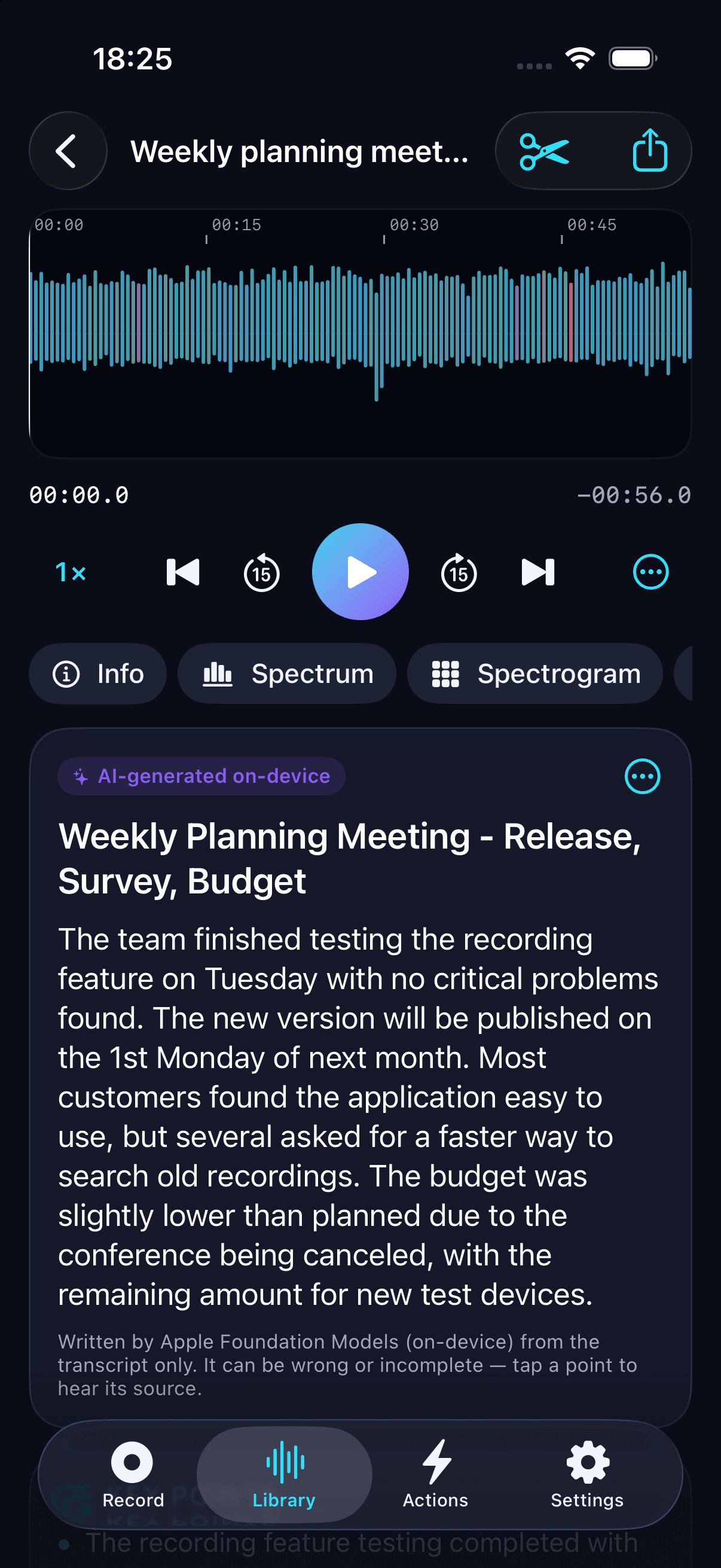
On devices with Apple Intelligence, summaries, key points, action items and decisions are written on-device, each linked to the line it came from. Points that cannot be traced to a transcript line are shown apart, and everything is labelled as AI-generated.
- 08
Non-destructive editor and export
Trim, split, merge, fades, gain, normalize and remove silences, with noise reduction, filters, equalizer and compressor; the original is never altered. Export WAV, AIFF, CAF, Apple Lossless or AAC, plus analysis reports and waveform and spectrogram images.
- 09
Import and ORIX Actions
Import audio files and the audio of your videos. Build workflows such as Analyze → Transcribe → Summarize → Export and run them on many recordings; audio steps render into a new recording and leave the original intact.
Screenshots
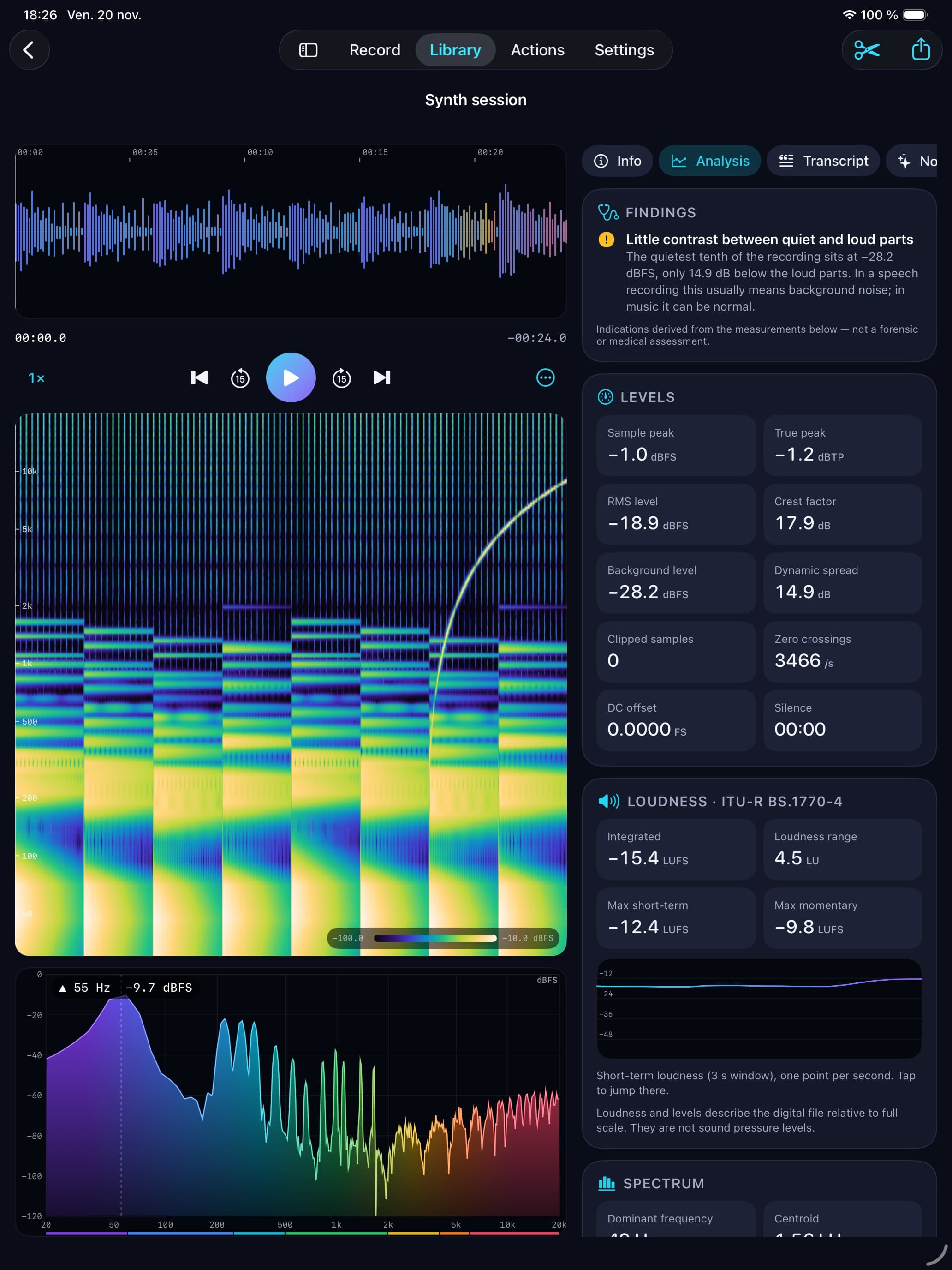
Recording: elapsed time, capture format, frequency-coloured waveform, live spectrum, and RMS, peak and momentary loudness meters. Spectrogram of a recording on a logarithmic frequency axis, with its dBFS colour legend. Spectrum at the playhead: a cursor reads frequency and level, with the seven band meters below. Analysis: a finding explained in plain words, then sample peak, true peak, RMS level and crest factor. Transcript with timestamps and search. In this simulator capture the transcript was produced by the same engine on a Mac and loaded for display. Meeting notes labelled "AI-generated on-device". The notes shown were generated by the engine on a Mac and loaded for display. Editor: split, insert silence, fades, gain, normalize to −1 dBFS, remove silences, enhance and merge, saved as a new recording. The analysis panel in the light appearance. iPad workspace: waveform, spectrogram and spectrum beside levels and ITU-R BS.1770-4 loudness. Recording on iPad: live waveform and spectrum side by side. In the simulator the recorder is fed from an audio file through the real capture pipeline.
A closer look
Capture that survives an interruption
Whatever the preset, a session is first written as uncompressed PCM to a capture master that is a complete, readable file at any instant, flushed to disk every two seconds. The library file is encoded when you stop and checked before the master is deleted. The app is designed to keep recording when the screen locks, with a Live Activity on the Lock Screen; this path has not yet been validated on a physical iPhone.
Loudness and levels with honest units
Loudness follows ITU-R BS.1770-4 for mono and stereo, with loudness range per EBU Tech 3342 and true peak by 4× oversampling. Every measurement is checked against signals whose answer is known in advance. The loudness tests use signals synthesised to the EBU specifications rather than the official EBU files, so this is an implementation verified against reference signals, not a certification.
Notes you can trace back to the recording
Apple's on-device language model reads the transcript, never the audio, and must cite the line behind every point. A citation holds only if the line exists and shares vocabulary with the point; tapping a verified point plays the recording from its source. The app has no speaker diarization: speakers are labelled by hand, and it never infers who is speaking from a voice.
An iPad workstation
On iPad the waveform, spectrogram, spectrum and analysis panels sit side by side. The time axis is shared between the waveform, the spectrogram and the playback cursor.
Technical specifications
- Platform
- iPhone (iOS) · iPad (iPadOS)
- Minimum OS
- iOS 26.0 · iPadOS 26.0
- Architectures
- Not verified yet
- Current version
- 1.0.0 (1)
- Release date
- November 19, 2026
- Exported build size
- 5.1 MB
- Permissions
- Microphone — requested at the first recording
- Speech Recognition — only when the legacy on-device recogniser is the path for the chosen language
- Face ID — only if you turn on the optional library lock
- Photos — no permission needed; videos are chosen with the system picker
- Offline
- Core features work offline and the app contains no networking code of its own. iOS may download a speech model when you ask for one; that transfers a model, not audio.
- Languages
- English · French (Canada)
- Dependencies
- None. Apple frameworks only (SwiftUI, AVFoundation, Accelerate/vDSP, Speech, FoundationModels, SwiftData, ActivityKit, App Intents).
- Bundle identifier
- ai.spboucher.orix.audio
Downloads
TestFlight beta
Build 1.0.0 (1) is processed on TestFlight and available to the developer's internal tester group only. It has not been submitted for Beta App Review, so no public invitation is open yet, and nothing has been submitted to the App Store.
Beta Access Coming Soon
A build is in TestFlight for internal testing. A public invitation has not been opened yet.
Not on the App Store yet.
Release data synchronized with SPB Git on November 21, 2026.
Release history
1.0.0 (1)
TestFlight · internal testing- First build uploaded to TestFlight and processed; available to internal testers only.
- Source published in the public orix-audio repository.
Privacy
ORIX Audio collects nothing: no account, no analytics, no advertising and no networking code. Audio, transcripts, notes and reports exist only on the device unless you export them.
- Transcription never falls back to a server; summaries use the on-device model or are unavailable.
- Files are stored under iOS file protection (complete until first user authentication), so recordings can be written while the device is locked.
- On the legacy recogniser path, iOS shows its stock prompt mentioning sending audio to Apple; ORIX Audio forces on-device recognition on that path and says so in its own text.
- A consent reminder is shown before the first recording, and recording is never hidden: the system microphone indicator and a Live Activity are present.
- There is no iCloud sync. Recordings are included in device backups like other app data, and the app offers no setting to exclude them.
- The app writes no log messages; transcript text is never logged. The prepared App Store privacy label is "Data Not Collected".
Verification status
Not yet validated on a physical device
Per the release report of 2026-11-20: 83 core tests (DSP, analysis, capture, editing, export) passed on macOS 27, and 21 app tests and 9 UI tests passed in the iOS 26.5 simulator (iPhone 17 Pro). There is no continuous integration; the suites are run by hand. 57 notes remain in the automated accessibility audit.
Nothing has run on a physical device. Locked-screen and background recording, the Live Activity and Dynamic Island, real microphones, route changes, phone-call interruptions and battery use are implemented against Apple's documented APIs but untested on hardware; the Live Activity has never been seen running. Transcription accuracy was measured on macOS with synthetic speech only, and Foundation Models notes were verified on macOS; generation fails in the iOS 26.5 simulator and has never run on an iPhone. Loudness was verified against synthesised signals, not the official EBU files. In the screenshots the recorder was fed from an audio file, and the transcript and notes were produced on a Mac and loaded for display.
Questions
Can I install ORIX Audio today?
Not publicly. Build 1.0.0 (1) is on TestFlight for internal testers only; it has not been submitted for external testing or App Review. By the project's own quality gates the app is not release-ready until background recording has been tested on a physical iPhone.
Does my audio leave the device?
No. The app contains no networking code; recordings, transcripts, notes and reports stay on the device unless you export or share them. If a speech model is not installed, the app asks before the system downloads it, and that transfers a model, not audio.
Does it identify who is speaking?
No. Speakers are not identified automatically; you can label lines by hand. The app never infers who is speaking from a voice.
Why is there no MP3 export?
iOS ships an MP3 decoder but no encoder, so MP3 files can be imported but not written. Audio exports are WAV, AIFF, CAF, Apple Lossless and AAC.
Do the levels measure how loud a room is?
No. Levels are relative to digital full scale (dBFS); the app does not measure sound pressure.
Are summaries available on every device?
Summaries appear only on devices where Apple's on-device language model is available; elsewhere the app explains why. Recording, analysis and transcription do not depend on it. Summaries are generated from an automatic transcript and can contain errors.
More from ORIX
See the full catalog Beta
ORIX Scan
Scan paper into clean, searchable PDFs: capture, enhancement, text recognition and export all run on your iPhone or iPad.
iPhoneiPadProductivityv1.0.0 Beta
ORIX Calc
Standard, scientific, financial, graphing, math, statistics, units and a reactive notebook on one exact engine, fully on device.
iPhoneiPadUtilitiesv1.0.0 In Development
ORIX Secure
A security, privacy, diagnostics and storage companion for iPhone and iPad. Real checks with their evidence; nothing leaves the device.
iPhoneiPadSecurity